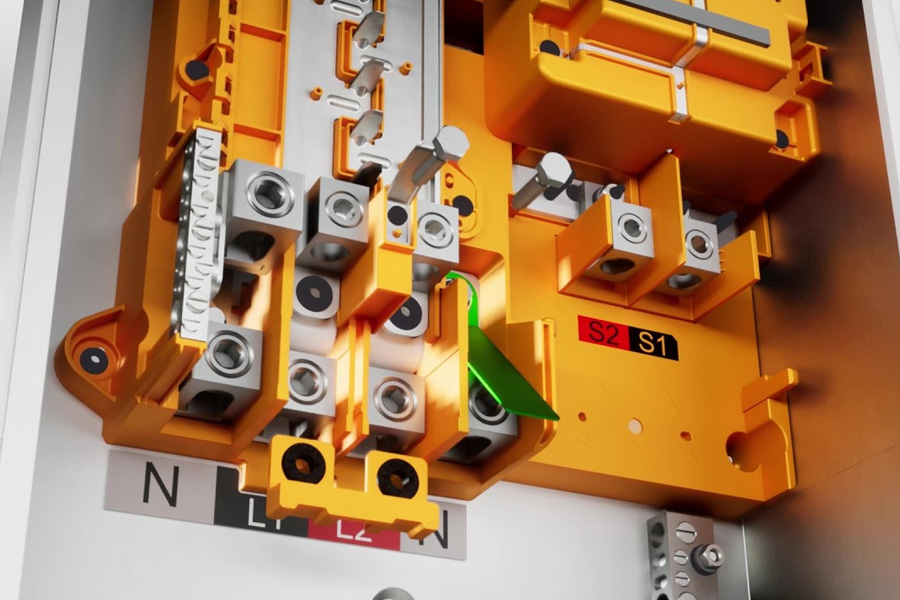
If you are researching Tesla’s home battery ecosystem, you have probably come across the Backup Gateway — a component that gets less attention than the Powerwall itself but plays an essential role. Understanding the tesla backup gateway 3 helps clarify how a Tesla energy system actually detects outages, switches to backup power, and manages the flow of electricity in your home.
What the Backup Gateway Does
The Gateway 3 is the brain of a Tesla home energy system. It performs several core functions: it detects grid outages and disconnects your home from the grid within a fraction of a second, it manages the transition to battery backup power seamlessly, it controls energy flow between solar, battery, home, and grid, and it enables system monitoring and control through the Tesla app. For whole-home backup, Tesla offers two options — a Gateway 3 or a Backup Switch — and either one enables the Powerwall to provide whole-home backup.
A quick note on naming: the current product that pairs with the Powerwall 3 is called the Gateway 3. The older Powerwall 2 paired with a component named the Backup Gateway 2. Both perform the same essential role in the system.
[Source: Tesla Gateway 3 documentation, tesla.com; Tesla Powerwall Owner’s Manual]
How It Works During an Outage
When the grid goes down, the Gateway senses the loss of power almost instantly and isolates your home from the grid — a critical safety step that protects utility workers from back-fed electricity. It then signals the Powerwall to begin supplying power, so quickly that most homeowners notice only a brief flicker, if anything at all. When grid power returns, the Gateway reconnects the home and resumes normal operation automatically.
Key Specifications and Dimensions
The Gateway 3 is a wall-mounted enclosure designed for indoor or outdoor installation, rated for the demanding conditions homes experience — including Houston’s heat and humidity. It houses the system’s controls, metering, and grid-disconnect hardware. Exact physical dimensions and electrical ratings are published on Tesla’s official datasheet, and because Tesla periodically updates hardware, homeowners should confirm the current tesla gateway 3 dimensions and specifications with their installer or the latest Tesla spec sheet before installation planning.
| Function | Role in the System |
| Grid outage detection | Senses loss of power and isolates the home in a fraction of a second |
| Automatic transfer | Switches to battery backup seamlessly |
| Energy management | Controls flow between solar, battery, home, and grid |
| Monitoring | Enables real-time visibility via the Tesla app |
[Source: Tesla Gateway 3 Datasheet, tesla.com (confirm current specifications with installer)]
How the Gateway Fits With the Powerwall
The Gateway 3 and Powerwall work as a pair: the Powerwall stores and delivers energy, while the Gateway 3 orchestrates when and how that energy moves. For Houston homeowners planning a battery installation, understanding this relationship is helpful when reviewing quotes. If you are evaluating a full system, it is worth reading more about tesla powerwall houston installation to see how the Gateway is included as part of the complete package.
| KEY TAKEAWAYS |
| • The Gateway 3 is the control center of a Tesla home energy system |
| • It detects outages and isolates the home in a fraction of a second for safety |
| • It manages energy flow between solar, battery, home, and grid automatically |
| • Exact dimensions and specs are on Tesla’s datasheet — confirm current figures with your installer |
| • Whole-home backup requires either a Gateway 3 or a Backup Switch — both are Tesla options |
| • The Gateway 3 is included as part of a complete Powerwall installation |
FAQ
Q: Is the Gateway 3 sold separately from the Powerwall? It is part of a complete Tesla home battery installation. Your installer includes the appropriate Gateway as part of the system.
Q: Can the Gateway 3 be installed outdoors in Houston? The Gateway 3 is rated for indoor or outdoor installation. Your installer will recommend the best location for your home.
Q: Does the Gateway 3 need internet to function? Core backup functions operate locally. Internet connectivity enables remote monitoring and app control.