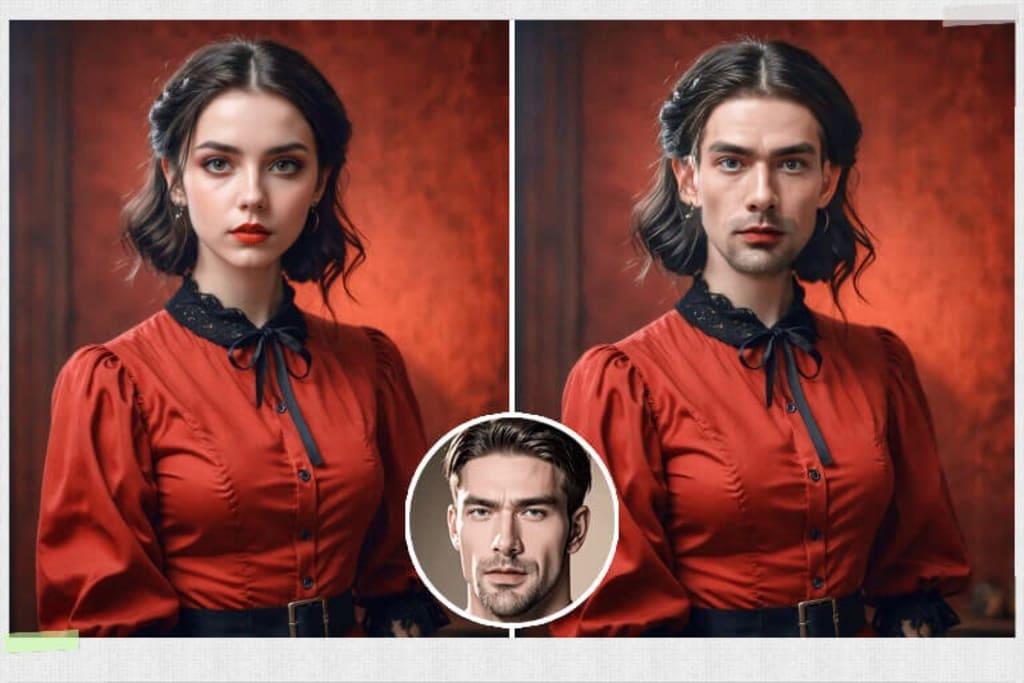
Content creation has changed dramatically over the last few years. What once required a professional studio and hours of post-production can now be done in minutes — directly in a browser, completely free. At the center of this shift is AI-powered face swapping, a technology that has moved well beyond novelty and become a genuinely practical tool for creators, marketers, and everyday users alike.
Two tools driving this change are the face swap tool and the multiple face swap tool: both free, both browser-based, and both producing results that would have required expensive software just a couple of years ago.
From Gimmick to Creative Essential
Early face swap technology had a reputation problem. Results were unconvincing — blurry edges, mismatched skin tones, obvious lighting inconsistencies. That reputation no longer applies. Modern AI uses deep learning models to analyze facial geometry, skin tone, lighting direction, and expression — producing replacements that blend into the original image or video with a level of realism that genuinely surprises first-time users.
What the Free Face Swap Tool Offers
The face swap tool is built around accessibility without compromising output quality. Upload your source media, upload a clear photo of the replacement face, and the AI processes the swap. The result is ready to download — clean, watermark-free, and immediately usable.
It supports photos, video files in MP4, MOV, M4V and WEBM formats, and animated GIFs — all from one interface. Cross-demographic swaps across different ages, genders, and skin tones are handled consistently well. No account creation, no subscription, no watermark removal step required.
Key Features
- Photo, video and GIF support in one interface
- Realistic AI blending matching lighting, skin tone and facial geometry
- No watermarks on downloaded results
- No registration required
- Fast processing for video content up to 200MB
- Cross-demographic accuracy across age, gender and skin tone
The Multiple Face Swap Tool: Built for Group Content
For creators working with group photos, team videos, or event footage, the multiple face swap tool solves a problem most free tools ignore entirely. Upload a group image or video and the AI automatically detects every visible face in the frame. Assign a replacement face to each person individually and all swaps are processed simultaneously in a single run — no repetition, no quality loss from multiple processing passes.
This capability is rare at the free tier. Most platforms either limit swapping to a single face or charge a premium for group functionality. Having it built into a free tool with the same output quality as the single face version makes this one of the most practical options available.
Who Uses These Tools
Social media creators use face swapping to produce surprising, shareable content that consistently drives engagement. Video producers working on low-budget projects use it as a cost-effective alternative to professional compositing. Marketing teams generate unique campaign visuals quickly. Event photographers create fun group content for clients. And personal users simply enjoy experimenting with photos and videos in ways that previously required professional help.
Getting the Best Results
A clear, well-lit, front-facing photo as the replacement face makes the single biggest difference in output quality. For video content, clips with relatively stable head positioning produce the smoothest results. Using high-resolution inputs for both source and replacement face ensures the final download looks sharp across all screen sizes.
Conclusion
The free face swap tool covers individual photo, video, and GIF editing with fast, realistic results and no registration barrier. The multiple face swap tool extends that to group content — solving a problem most free alternatives don’t address at all. Together they form one of the most complete free AI face editing setups available today, practical enough for professional creative work and accessible enough for casual use.